April 2, 2026
SEO Keywords for Photographers: The Complete List (Organized by Niche)
Most keyword lists give you 100 terms and zero strategy. Here's the actual list, organized by niche, with real volume data.

Most “keyword lists for photographers” are useless.
Not because the keywords are wrong, but because they give you 100 generic terms, zero context, and no explanation of what to actually do with them. You end up with a spreadsheet full of words you don’t know what to do with other than “write an article”. There’s a lot more to SEO than that!
I do keyword research for photographers daily. It’s one of the most important parts of what I do with an SEO client, and after doing this across 110+ photographers' websites, the pattern is very clear. The photographers who start ranking aren’t the ones who wrote a bunch or articles from generic keywords. They’re the ones who understood which keywords their ideal clients were actually searching, matched those keywords to the right pages, and then gave Google something worth ranking.
That’s what this guide is about.
We’ll cover the types of keywords that matter, how to find the right ones for your specific business, and then go through an actual keyword list organized by photography niche.
You’ll have both the strategy and the goods!
The Three Types of Keywords Photographers Need to Know
Before we get into the list, you need to understand something that most photographers (and honestly, a lot of SEO blogs) get wrong: not all keywords are created equal. Ranking for the sake of ranking can be worthless to a business.
There are three types of keywords, and they serve different purposes on your website.
“Ready to book” keywords (transactional): These are people who have already decided they want to hire a photographer. Now they’re browsing the internet to find the right one. Words like: “Denver wedding photographer,” “family photographer near me,” “headshot photographer Austin.” These keywords belong on your homepage and service pages. They are the core of your SEO ranking strategy.
“Researching” keywords (informational): These people aren’t ready to book yet, they’re trying to figure stuff out (consideration phase). “What to wear for engagement photos.” “How much does a wedding photographer cost?” “Best wedding venues in Nashville.” These are your blog post keywords. The readers here are future clients who are working their way toward booking. They are close to buying intent but not there just yet.
“Exploring options” keywords (comparison/commercial): Somewhere in between the other two types are people comparing options, evaluating photographers, and weighing decisions. “Best wedding photographers in Chicago.” “Photographer vs videographer.” “Photography packages and pricing.”
Here’s the thing most photographers miss: they only target the first category.
They optimize their homepage and maybe one service page, and that’s it. Meanwhile, they are missing out on the informational keywords that address the research phase. These represent a massive amount of search volume. And more importantly, showing up there builds trust with potential clients before they’re even ready to inquire.
A couple reads your blog post about “what to wear for engagement photos” six months before their wedding. Three months later, when they’re ready to book, whose name do they remember? Make it yours!
That’s the long game. And it’s how photographers use blog content to actually win clients, not just traffic.
How to Find the Right Keywords for YOUR Photography Business
Here’s where I diverge from every other article you’ll find on this topic: I’m going to show you how to find keywords yourself, not just hand you a list and send you on your way.
Why? Because the most valuable keywords for your business are hyper-specific to your city, your niche, and your clients. No generic list is going to show you those types of keywords.
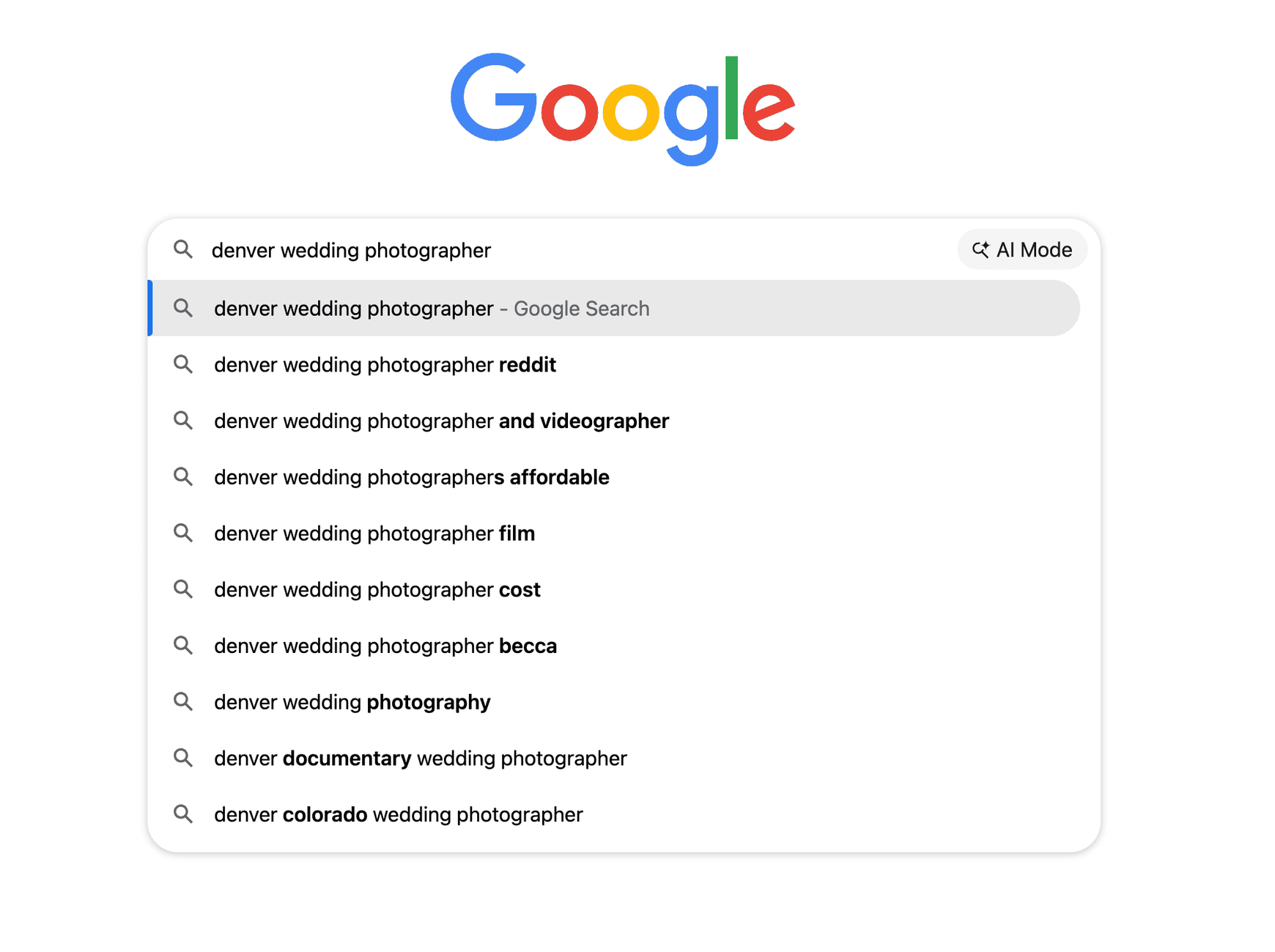
Here’s the process I walk through with clients:
Step 1: Google autocomplete. Open an incognito window (so your search history doesn’t skew results) and start typing. “[Your city] wedding photographer” and make note of every suggestion that pops up. Then try “[your city] family photographer,” “[your city] newborn photographer,” and so on. Do this systematically across every service you offer. Google is literally telling you what people are searching, and those are great keywords you can use to rank.
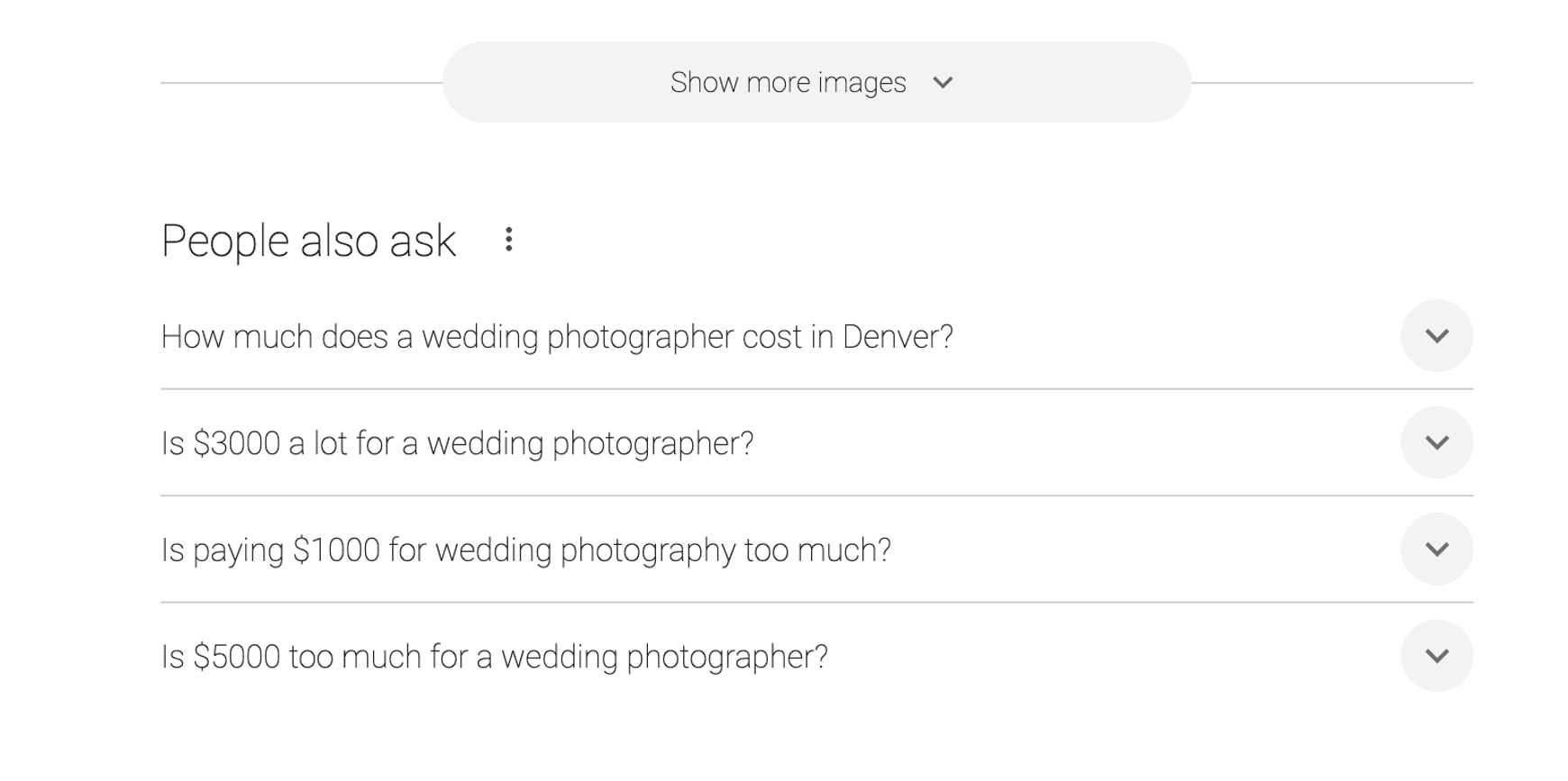
Step 2: People Also Ask - boxes. Search one of your target keywords and scroll down to the “People Also Ask” section below the first results. These are real questions people are asking Google, and they’re perfect blog post and FAQ ideas. Screenshot these and add the ones you like the most that are most relevant, to your list.
Step 3: Google Keyword Planner. It’s free with a Google Ads account (you don’t have to run ads to use it). Type in your core keywords and it’ll show you volume ranges and suggest related terms you might not have thought of. The ranges are broad, but the data is still very useful.
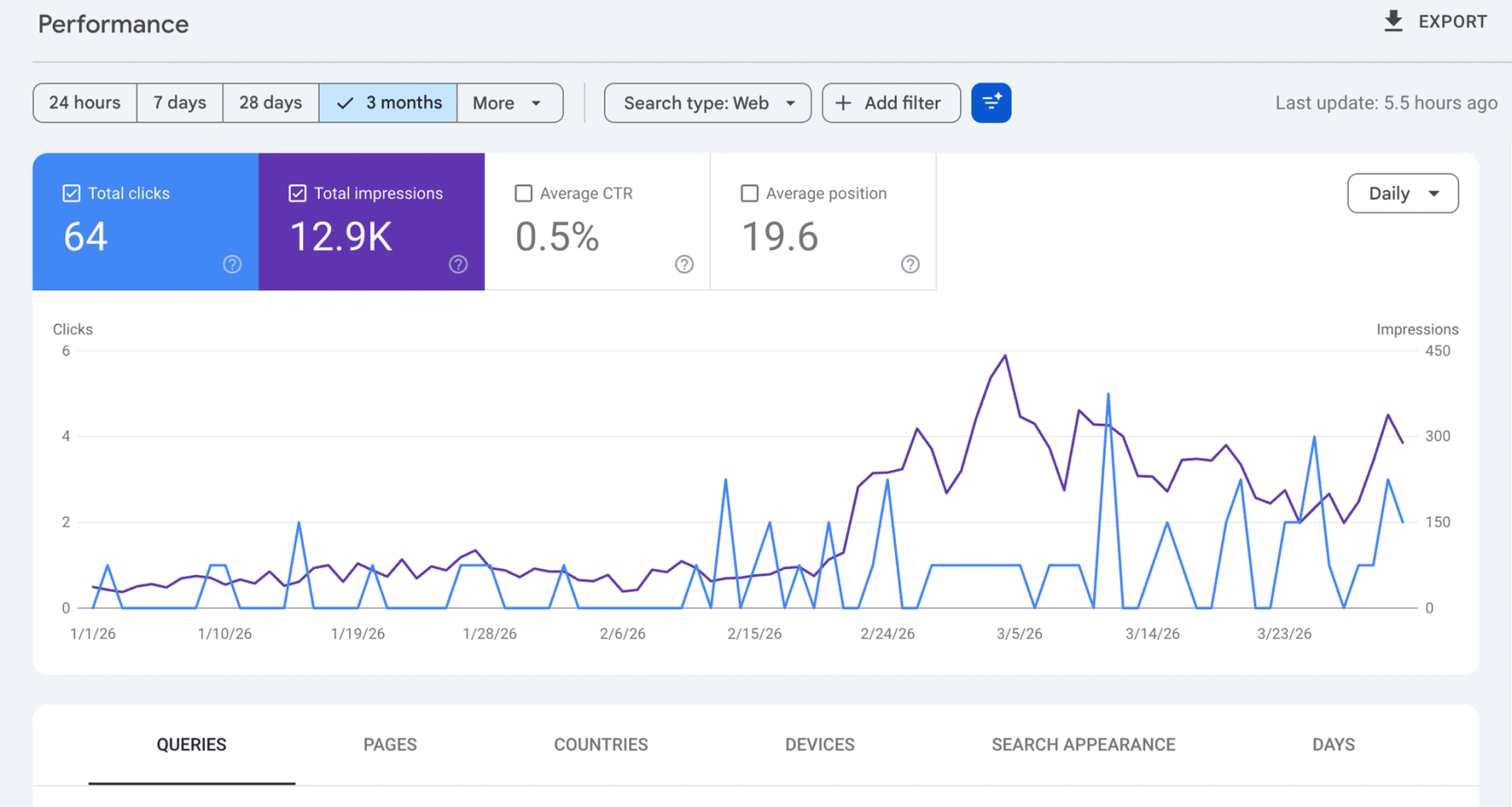
Step 4: Google Search Console. This may just be the most underused tool in photography SEO. Log into your GSC or create your account (free tool!) go to “Search results” and look at what queries are already bringing impressions to your site, even at position 40 or 50. These are keywords Google already thinks are relevant for your site. You can often move from page 4 to page 1 on those terms with targeted content improvements, because you’ve already cleared the first hurdle. (quick hack: update the meta description and title for page 2 keyword results to reflect those words and make them enticing. This generally leads to position improvements.)
Step 5: Competitor analysis. Google your city + your specialty. Look at who’s on the first page. Check what they have in their title tags, their headings, their page copy. You’re not copying them, you’re understanding what’s working in your market so you can do it better. SEO is all about competitive research and a lot of keyword goldmines are sitting in plain sight.
Keyword List by Photography Niche
Alright. Now you’ve got a better feel for this whole keyword “thing”. Here’s the list.
I’ve organized this by niche because a keyword list that lumps “wedding photographer Seattle” next to “product photographer Seattle” isn’t very useful, they belong on completely different pages, target completely different clients, and have different competitive landscapes.
For each niche, I’ve included approximate monthly volume ranges (how often they are searched) and a note on which page of your site each keyword belongs on. Keep in mind these are U.S. national averages and volume will vary based on your market size.
Wedding Photography Keywords
| Keyword | Monthly Volume | Difficulty | Where it Goes |
|---|---|---|---|
| [city] wedding photographer | 500–5,000+ | High | Homepage or Wedding page |
| wedding photographer near me | 10,000+ | Very high | Homepage |
| affordable wedding photographer [city] | 50–500 | Medium | Wedding page |
| elopement photographer [city/state] | 100–1,000 | Medium | Elopement page |
| destination wedding photographer | 500–5,000 | High | Specialty page or blog |
| intimate wedding photographer | 50–500 | Low-Medium | Blog or niche service page |
| wedding photography packages | 500–5,000 | High | Pricing page |
| how much does a wedding photographer cost | 1,000–10,000 | Medium | Blog post |
| boho wedding photographer [city] | 50–500 | Low | Blog or gallery page |
| wedding photographer [specific venue] | 50–500 | Low | Venue blog post |
| second shooter wedding photography | 100–1,000 | Low | Blog or FAQ |
Venue-specific keywords are some of the most overlooked opportunities in wedding photography SEO. Writing a blog post about a specific venue like “A Day at [Venue Name]: What to Expect from Your Wedding Photos” targets a keyword with almost no competition while putting you directly in front of couples researching that venue. Do one for every venue you’ve shot at and build it into a guide for the venue with links.
Portrait & Family Photography Keywords
| Keyword | Monthly Volume | Difficulty | Where it Goes |
|---|---|---|---|
| family photographer [city] | 100–5,000 | Medium-High | Family page |
| family photos [city] | 100–1,000 | Medium | Family page |
| outdoor family photographer near me | 100–1,000 | Medium | Family page |
| holiday mini sessions [city] | 100–1,000 | Low | Seasonal page or blog |
| family portrait photographer [city] | 50–500 | Medium | Family page |
| what to wear for family photos | 1,000–10,000 | Low | Blog post |
“What to wear for family photos” is one of the best informational keywords in this niche. It gets searched constantly, it’s relatively easy to rank for, and the people searching it are clearly in the process of booking family photos. You’re not selling to them directly, you’re helping them. It works because Google shows the photographers sites that are local to the keyword when appropriate.
Senior Photography Keywords
| Keyword | Monthly Volume | Difficulty | Where it Goes |
|---|---|---|---|
| senior photographer [city] | 50–1,000 | Medium | Senior page |
| senior pictures [city] | 100–1,000 | Medium | Senior page |
| senior portrait photographer near me | 100–1,000 | Medium | Senior page |
| unique senior picture ideas | 100–1,000 | Low | Blog post |
| best places for senior pictures [city] | 50–500 | Low | Blog post |
The “ideas” and “best places” keywords here are especially good for blog content and will bring in parents and students who are actively researching, give you a chance to show off your local knowledge, and naturally lead to a call-to-action for booking. In addition to these posts, posting about each location you shoot at after the shoot by name will naturally reinforce your location and rankings with Google and help you rank for more specific searches.
Pet Photography Keywords
This is a niche I know well because I’m a photographer myself, and I’ve worked with a lot of pet photographers directly. It’s a smaller market than wedding or family, but the keyword competition is genuinely lower and the clients who find you are often highly motivated.
| Keyword | Monthly Volume | Difficulty | Where it Goes |
|---|---|---|---|
| pet photographer [city] | 50–500 | Low-Medium | Pet page |
| dog photographer [city] | 50-500 | Low | Pet page |
| pet photography near me | 100–1,000 | Low | Pet page |
| pet portrait photographer | 100–1,000 | Low | Pet page |
| dog photo session | 50–500 | Low | Pet page or blog |
| how to prepare your dog for a photo session | 50–500 | Very low | Blog post |
That last one, “how to prepare your dog for a photo session”, is a great example of an informational keyword that does double duty: it brings in organic traffic AND serves as useful content you can send to clients after they book. One more idea? Post about hikes in the area that are great with pets, local pet boutiques, and parks that are dog-friendly or off-leash. The more local you get with these the better.
Headshot & Branding Photography Keywords
| Keyword | Monthly Volume | Difficulty | Where it Goes |
|---|---|---|---|
| headshot photographer [city] | 100–5,000 | Medium-High | Headshots page |
| professional headshots [city] | 100–5,000 | Medium-High | Headshots page |
| corporate headshots near me | 100–1,000 | Medium | Headshots page |
| personal branding photographer [city] | 50–500 | Low-Medium | Branding page |
| linkedin headshot photographer [city] | 50–500 | Low | Headshots page or blog |
| how much do headshots cost | 1,000–10,000 | Low-Medium | Blog post |
“How much do headshots cost” is consistently one of the most-searched informational queries in this niche. If you offer headshots, you should have a blog post that addresses this question directly, with your pricing range included. Clients who find that post are doing price research. Be upfront with them and you’ll earn their trust (and often their booking). Post about recent shoots with clients permission as well and reference locations if you go to them directly.
Newborn Photography Keywords
| Keyword | Monthly Volume | Difficulty | Where it Goes |
|---|---|---|---|
| newborn photographer [city] | 100–1,000 | Medium | Newborn page |
| newborn photography near me | 500–5,000 | High | Newborn page |
| in-home newborn photographer [city] | 50–500 | Low | Newborn page or separate in-home page |
| newborn photo session | 100–1,000 | Medium | Newborn page |
| when to book a newborn photographer | 100–1,000 | Low | Blog post |
| what to expect at a newborn photo session | 100–1,000 | Low | Blog post |
“When to book a newborn photographer” is gold. It answers a question every expecting parent has, and people searching it are quite literally pregnant clients in the exact window you want to reach them. If you’re a newborn photographer and you haven’t written this blog post yet, put it on the list. Your site will reinforce location and Google wants to serve local results for all of these inquiries, so don’t be worried that other photographers already answer this on their site. It all reinforces your SEO.
Real Estate & Commercial Photography Keywords
| Keyword | Monthly Volume | Difficulty | Where it Goes |
|---|---|---|---|
| real estate photographer [city] | 100–1,000 | Medium | Real estate page |
| commercial photographer [city] | 50–500 | Low-Medium | Commercial page |
| product photography [city] | 50–500 | Low-Medium | Product page |
| architectural photographer [city] | 50–500 | Low | Architectural page |
| how much does real estate photography cost | 500–5,000 | Low-Medium | Blog post |
Real estate photography is a competitive niche with a very practical client base. Agents are making business decisions, not emotional ones. Pricing transparency converts well here. Answer the cost question clearly and you’ll stand out from photographers who hide their rates. Posting about recent shoots and linking to the listings is a great approach here to start showing up for your core keywords.
Where Each Keyword Belongs on Your Website
Having the right keywords is half the work. Knowing where to put them is the other half.
Here’s a quick breakdown:
| Page | Keyword Type | Example |
|---|---|---|
| Homepage | Primary city + specialty | “Denver Wedding Photographer” |
| About page | Branded / personal | “[Your name] photographer” |
| Service pages | Each service gets its own page and keyword | “Denver Family Photography” |
| Blog posts | Informational + long-tail + venue-specific | “Best Wedding Venues in Colorado” |
| Portfolio/gallery pages | Style-based keywords but not a major ranking page | “Moody film wedding photography” |
| Location pages (if serving multiple cities) | Nearby city + specialty | “Boulder Wedding Photographer” |
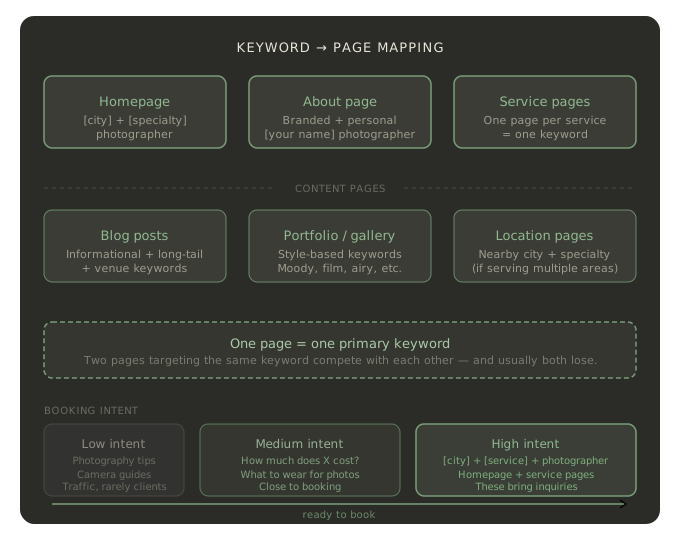
The rule that underlies all of this: one page = one primary keyword. Stick to this!
If two of your pages are both targeting “Denver wedding photographer,” they’re competing with each other for the same ranking spot. Google has to pick one — and usually neither wins cleanly. Every page should have a clear, unique word targeted.
When you have multiple pages with the same main keyword you have something called keyword cannibalization, and it’s more common than you’d think. If your homepage and your wedding page both say “Denver wedding photographer” in the title tag, you’ve got a problem worth fixing.
The Keywords That Actually Drive Bookings
Not all traffic is equal. This is something I see photographers get wrong. They celebrate ranking for a keyword with 1,000 monthly searches and then wonder why their inquiry form isn’t blowing up. It DOES help the sites overall SEO, but not the way they think.
Here’s how to think about it in terms of booking intent:
High booking intent: [city] + [service] + “photographer.” These people are actively looking to hire someone. If you rank for these, you get inquiries.
Medium intent: “How much does a [type] photographer cost.” They’re close. They’re comparing options and figuring out a budget. A well-written blog post here that’s honest and shows your personality can push them over the edge.
Low intent but high volume: “Photography tips,” “best camera settings for outdoor portraits,” “how to edit photos in Lightroom.” These bring traffic. Almost never clients. They’re fine if you want blog views, but don’t confuse traffic with business. Traffic will however help your site as a whole for SEO because Google likes to rank more pages when a site has one that ranks well.
The local SEO angle matters here too: for most photographers, ranking in the Google Map Pack (the 3-pack of results that shows up with a map) for their city and specialty is worth more than ranking #1 in the regular organic results. The Map Pack appears above everything else and gets the largest share of clicks. (That’s a whole separate topic, but if you’re not optimizing your Google Business Profile, that’s the first thing I’d fix.)
How to Know If Your Keywords Are Working
Set up Google Search Console if you haven’t already. It’s free, it connects to your website, and it shows you exactly which search queries are bringing up your site, how many clicks you’re getting, and where you’re ranking.
A few things to watch:
Impressions without clicks means you’re showing up but not getting chosen. That usually points to a title tag or meta description that isn’t compelling enough. It means that your ranking positions are low enough that people aren’t scrolling to you. This could also be related to backlinks but that’s an entirely different component of SEO.
“Striking distance” keywords are the ones sitting at positions 5–20. You’re close. A content update, some additional internal links, or a few new backlinks can push you into top 5 territory. These are the highest-ROI improvements you can make to an existing site. Improve your meta and title here as well if they aren’t very good by reviewing the ones that the top 5 sites are using and making yours similar.
Keywords you didn’t know you had. GSC regularly surfaces queries you never even went after. Those are signals that Google thinks your content is relevant to that topic. Sometimes a small addition to an existing page (or a new blog post) can turn a page - 4 impression into a page -1 click.
Check it monthly. The data compounds over time. Just don’t become too obsessed, trust me!
Quick Questions and Answers (FAQ)
How many keywords should a photographer target?
Focus on one primary keyword per page. Most photographer websites should be targeting 15–30 unique keywords spread across their homepage, service pages, and blog posts. More isn’t better, quality and clarity wins every time.
What are the best free keyword tools for photographers?
Google Keyword Planner, Google Search Console, and Google autocomplete (simply search to see this one) will get you 80% of the way there for free. Ubersuggest has a limited free tier and will take you in-depth. AnswerThePublic is great for surfacing question-based keywords. Keep in mind that tools like SEMRush and Ubersuggest have limited “local” knowledge. So they might show no searches for a keyword that Google Search Console reveals you are ranking well for and receiving clicks.
How long does it take to rank for photography keywords?
New pages typically need 3-6 months to gain traction. Local keywords in smaller markets can move faster. Competitive terms like “wedding photographer [major city]” can take 6-12+ months, especially if the established photographers in your market have strong backlink profiles. If you already have a strong backlink profile and an established presence words can start ranking in weeks or less.
Should I target keywords for every city near me?
Only if you’re going to create real, valuable content for each one. A location page that’s just copy-pasted with the city name swapped out isn’t going to rank well. Google’s seen that trick a thousand times. If you do create location pages, make them genuinely useful, mention actual venues, neighborhoods, parks, and use context that someone from that city would recognize as real.
What’s the difference between short-tail and long-tail keywords?
Short-tail: “wedding photographer.” Very high volume, brutal competition. For this word you’re up against every wedding photographer in the country plus major directories.
Long-tail: “affordable outdoor boho wedding photographer in Fort Collins Colorado.” Much lower volume, almost no competition, and anyone searching that term knows exactly what they want. Long-tail keywords are where most photographers should be spending their energy, especially early on.
Do I need separate pages for “photographer” and “photography” keywords?
Generally no. Google understands that “wedding photographer” and “wedding photography” are the same thing. Use “photographer” on About and service pages (since that’s how people refer to hiring you) and “photography” in blog post titles and portfolio descriptions when it reads more naturally.
Do I need to use the term “near me”?
I see this one all the time. Do not add “near me” to any keywords on your site. It’s inferred by Google and adding it looks sloppy without any benefits.
Putting It Together
Keywords are the foundation. But ranking for them takes more than just knowing which words to use.
Once you’ve identified the right keywords for your business, the next step is creating content that targets the informational keywords and builds your topical authority over time. (If you’re not sure where to start, my guide to blog post topics for photographers walks through exactly how to turn a keyword list into a content calendar.)
And none of it sticks without the authority that comes from other websites linking to yours. Keywords tell Google what you’re about. Backlinks tell Google whether to trust you. If you want to understand how that piece works, check out the full rundown on backlinks for photographers here.
The bigger picture covering how all of these pieces fit together into a complete SEO strategy is in my SEO for Photographers guide. It’s the best place to start if you’re just getting your bearings or want to build your comprehensive plan.
Keywords are just the first step. But they’re the right first step, and now you’ve got the list and the framework to actually use them.
Spotted something in your Google Search Console that you want to talk through? Or want to skip the DIY route and have me handle your keyword strategy? Let’s talk.
Once you've picked your keywords, use the AI Bulk Meta Generator to write voice-matched meta descriptions for every page in seconds. It's part of a free SEO toolkit built specifically for photographers.