May 8, 2026
Is Showit Good for SEO? An SEO Pro's Honest Take
After building dozens of Showit sites and tanking my own rankings during migration, here's the honest answer on Showit SEO.
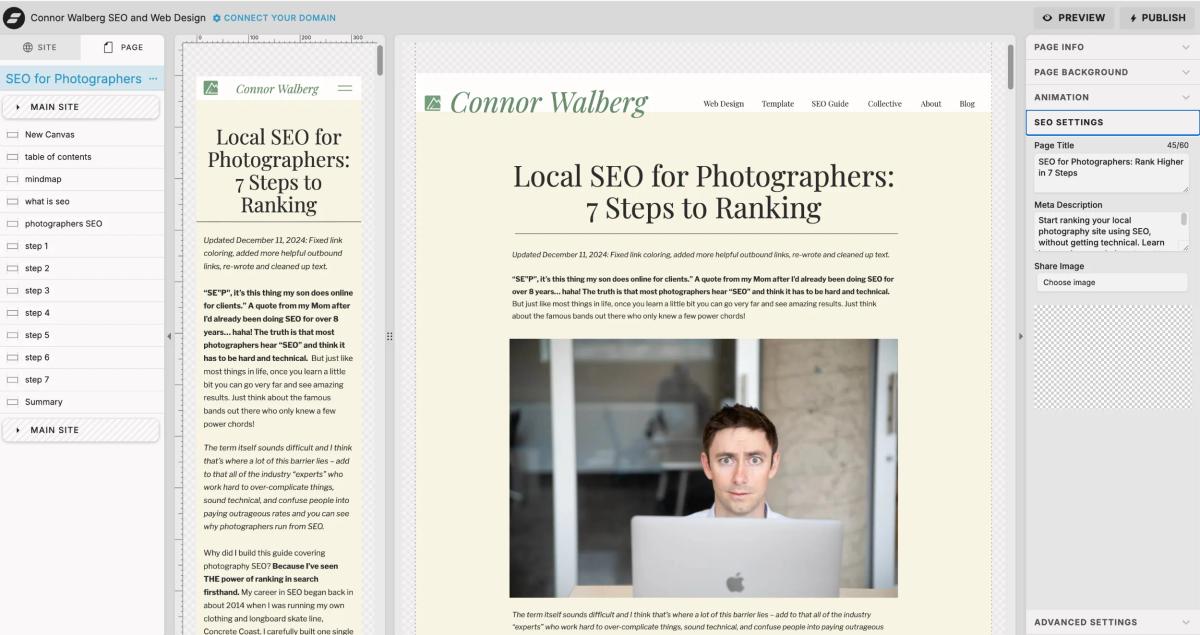
There’s a lot of information on the internet that can be misleading when you look this up. And oftentimes you’ll simply hear: "Showit is great for SEO!" You’ll get the opposite answer from random people on Reddit and SEO Twitter: "ShowIt is broken, switch to Squarespace or WordPress."
Both are wrong. But not completely.
I've been doing SEO professionally since 2014 and I currently build custom Showit sites for photographers. I see the same SEO problems get created on Showit sites over and over, and I fix them on every project I take on. This article is what I wish someone had handed me when I started building using the platform.
Here's the short version, then we'll get into the details:
The actual answer
Showit is good for SEO if you build it correctly. It's bad for SEO if you build it the way most photographers and even most Showit designers build it.
The platform itself isn't the problem. The default settings are. Showit gives you full control over every SEO element that matters, but it doesn't enforce best practices, and the design freedom that makes Showit beautiful is the same freedom that lets you accidentally tank your own SEO.
Most Showit sites I audit have multiple H1 tags, no proper heading hierarchy, broken links hidden inside mobile-only canvases, image alt text in the wrong field, and a blog setup that nobody has dialed in correctly. Fix those things and a Showit site will rank as well as any platform on the internet.
Where Showit's bad SEO reputation came from
Three myths get repeated constantly. They were partially true a decade ago and they're simply not true now.
Myth 1: Showit uses JavaScript and Google can't crawl it
This was a real concern around 2015. Googlebot (which crawls the web to rank sites) didn't render JavaScript well, and JavaScript-heavy pages were crawled poorly. Showit renders pages using a mix of HTML and JavaScript, so it caught some of that reputation.
Google has been rendering JavaScript reliably for years. I've watched dozens of Showit sites get crawled and indexed without issue. If you check your Google Search Console coverage report on a properly built Showit site, you won't see JavaScript-related crawl errors. The myth has outlived the problem. I’ve also built multiple sites using Framer which runs on Javascript and they rank highly!
Myth 2: You need to switch to Squarespace or WordPress
This usually comes from people who don't actually do SEO. Switching platforms is one of the most disruptive things you can do to a site and it almost never improves SEO on its own. The variables that move rankings are content, keywords, links, technical health, and user signals. Your platform is a tool, not a strategy.
I've worked on Squarespace sites, WordPress sites, Wix sites, Webflow sites, and Showit sites. The platform difference matters way less than the things you do on whatever platform you pick. If you want a deeper comparison, I wrote about Framer vs WordPress which gets into this question for one specific platform pairing. The takeaway applies across platforms: stop platform shopping and start optimizing.
Myth 3: Showit is just for photographers and isn't taken seriously
Showit was built for photographers, but it's been used by coaches, designers, copywriters, therapists, and creative service providers for years. Google doesn't know or care what kind of business you run. It cares whether your site answers the searcher's question.
All three of those myths get tossed around in Facebook groups and on Reddit. None of them are reasons to avoid Showit.

What Showit actually does well for SEO
Before I get into the problems (and there are real problems), let me cover what the platform gets right. This stuff matters because it's the foundation everything else sits on.
Full control over the SEO basics, including image alt text
Page titles, meta descriptions, H1 through H6 tags, alt text, page slugs (kind of), schema markup. You can edit all of it. Some platforms hide these settings or auto-generate them. Showit puts them in front of you and lets you write them yourself, which is what you want for solid SEO.
One underrated win: alt text on background images actually works on Showit. On most platforms, when you set an image as a background or canvas element, that image becomes a CSS background, which means it doesn't get crawled or indexed by Google. Showit codes background images so they're still part of the page content. You can apply alt text to them and they show up in Google Image Search. For photographers, that means your portfolio images can drive search traffic on their own.
The WordPress blog connection
Every Showit plan that includes a blog runs that blog on WordPress. Most photographers don't realize what a big deal this is. WordPress is the most powerful blogging platform in existence, and you get access to plugins like Yoast SEO and Rank Math that no other website builder offers in any meaningful way. Combined with a strong keyword strategy, your blog can rank for hundreds of long-tail searches that your main pages never could.
More on this later, because most photographers completely waste this opportunity.
Heading tags decoupled from formatting
On Squarespace, if you want a piece of text to be H2, you have to make it look like an H2 (which usually means big and bold). That coupling forces you to choose between visual design and SEO structure.
On Showit, the heading tag is independent of the formatting. You can have a tiny H1 if you want, or a giant paragraph. That's a powerful feature for an SEO who knows what they're doing - but it has been said that Google DOES care about text size as well for headings…
This is also one of the biggest sources of Showit SEO problems, which brings us to the next section.

Where Showit makes SEO harder than it should be
These are the issues I see on almost every Showit site I audit. None of them are deal-breakers, but they're all things you have to actively fix because the platform won't fix them for you.
The heading tag problem
Because Showit decouples HTML tags from visual formatting, designers default to picking heading tags based on size. Big text becomes H1. Smaller text becomes H2. Even smaller text becomes H3. Visually it makes sense. From an SEO standpoint, it's a disaster.
On a typical Showit site I audit, I'll find:
- Three or four different H1 tags on the homepage
- No H1 at all on service pages
- H2s used as decorative headers in the footer
- Body copy tagged as H3 because the designer wanted it slightly larger
Every page should have exactly one H1 that describes what the page is about. H2s should mark major sections. H3s nest under H2s. It's a hierarchy, not a font size selector.
If you take nothing else from this article, audit your heading tags this week. It's the single highest-leverage SEO fix on most Showit sites.
Hidden mobile and desktop canvases load anyway
Showit lets you design completely separate desktop and mobile views, which is fantastic for the user experience. Here's the catch: when you switch between them, the platform uses CSS display:none to hide the version you're not looking at. That means both versions load, both versions are part of the page code, and both versions get crawled.
If you have filler text in a hidden mobile canvas ("Lorem ipsum" because you ran out of time), Google sees it. If you have a broken link inside a desktop section that's hidden on mobile, Google still finds it. If you copy-pasted an old layout into a hidden canvas "just in case," that hidden content is part of your site as far as Google is concerned.
Audit both your desktop and mobile canvases for every page. Delete anything you're not actually using. Make sure your content is consistent between the two views.
Page title becomes the URL with no override
Most platforms let you customize the URL slug independently from the page title. WordPress, Squarespace, Webflow, all of them. Showit ties the page name directly to the URL with no way to set them separately.
If you name your page "Wedding Photography Services in Denver, Colorado," your URL becomes /wedding-photography-services-in-denver-colorado. That's not a great URL. It's too long, and you can't restructure your URL hierarchy without renaming pages.
The workaround is to name your pages exactly what you want the URL to be, and then set the SEO title separately in the SEO settings panel. The page name controls the URL. The SEO title controls what shows up in Google. Most photographers don't realize these are different fields. It’s unfortunate that ShowIt has no setting that allows you to write your own URL slug but it’s most likely to keep people from breaking pages.
The image SEO field confusion
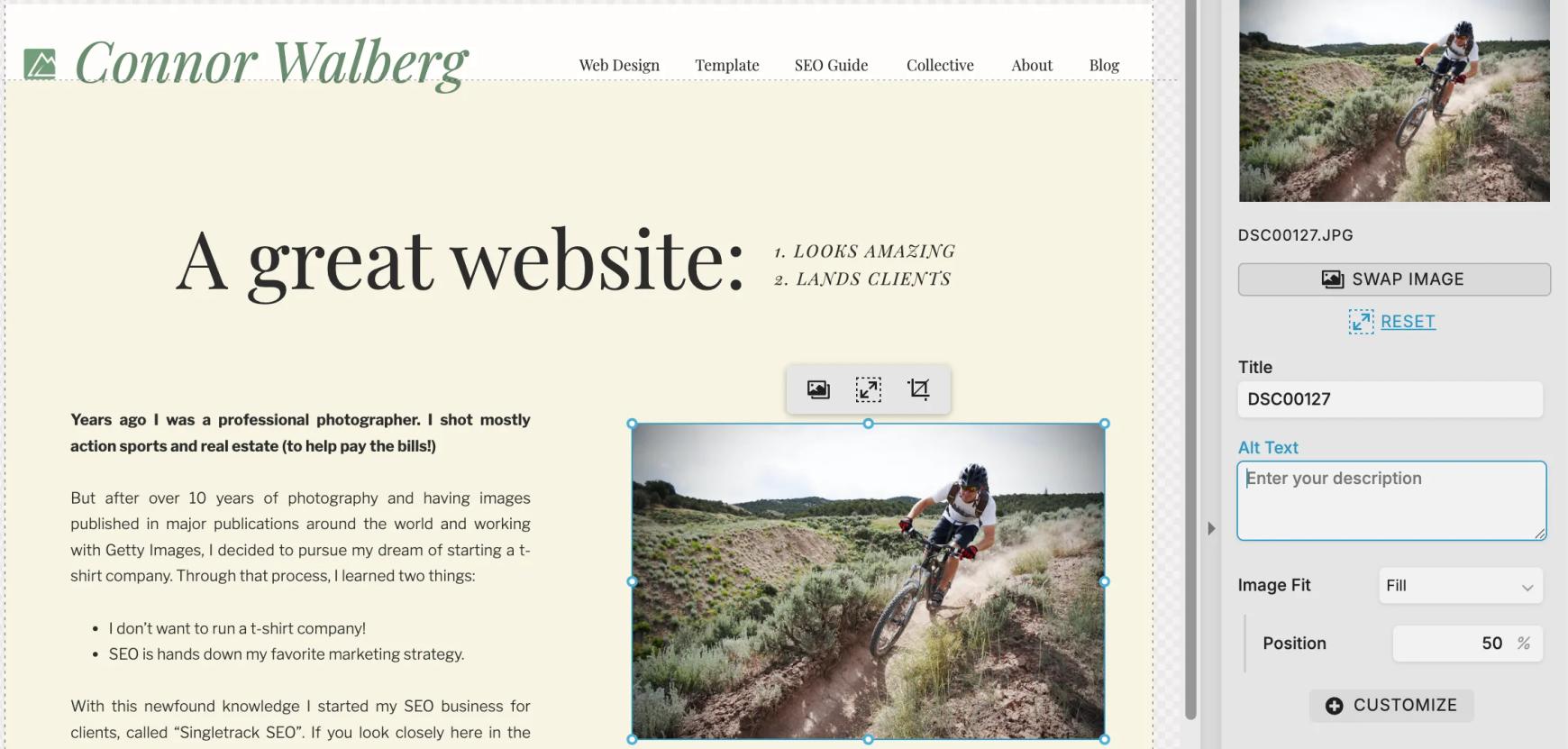
This one trips up everyone. When you click an image in Showit, you see two fields: "SEO Title" and "Alt Text."
SEO Title gets used as the image title attribute, which is mostly ignored by Google. Alt text is the more important text that Google cares about, but it must be an accurate description (shortcut here, drop the image in an AI tool and ask it to write the alt text for you. Just make sure to add the correct location when applicable.)
Use SEO Title for a brief, descriptive title that includes your keyword. Most photographers I audit have done it backwards or left one of the two fields empty - sometimes they haven’t done this at all.
The image rendering and caching problem
Showit serves images well, but the platform encourages designers to load 30 to 60 high-resolution photos per page on portfolio sites. Even compressed, that's a lot of payload. Pair that with custom fonts, video backgrounds, and animations, and you can end up with a site that loads slowly. Slow sites rank worse, and 46% of all Google searches are local, which means your competition is everyone in your area, including the photographer with a faster site.
Compress every image before you upload it. Use ShortPixel or TinyPNG. Aim for under 200KB per image. Don't load 60 portfolio images on the homepage when 12 will do. For fonts, make sure you only have the fonts that you are using added to the site, a lot of photographers will add multiple fonts and then as they switch, leave the existing fonts in the font manager. This leads to site bloat that causes slower loading times that are easy to avoid.
The blog gap
Almost every photographer I work with has spent hours optimizing their Showit pages and zero hours optimizing their WordPress blog. They don't realize the blog is a different platform with different settings. They write blog posts inside WordPress, hit publish, and never touch a meta description or a heading tag.
Your blog is where most of your long-tail traffic will come from. It's where you rank for venue-specific searches, vendor recommendations, pricing guides, and anything else that isn't your service page or homepage. Ignoring the WordPress side of a Showit site is leaving 70% of your SEO opportunity on the table.
The two Showit migration mistakes that tanked my own SEO
I'm going to share something embarrassing because it might save you months of frustration. When I migrated my own site to Showit, I lost rankings. I'm an SEO. I do this professionally. And I still got bit by two technical details that nobody warns you about.
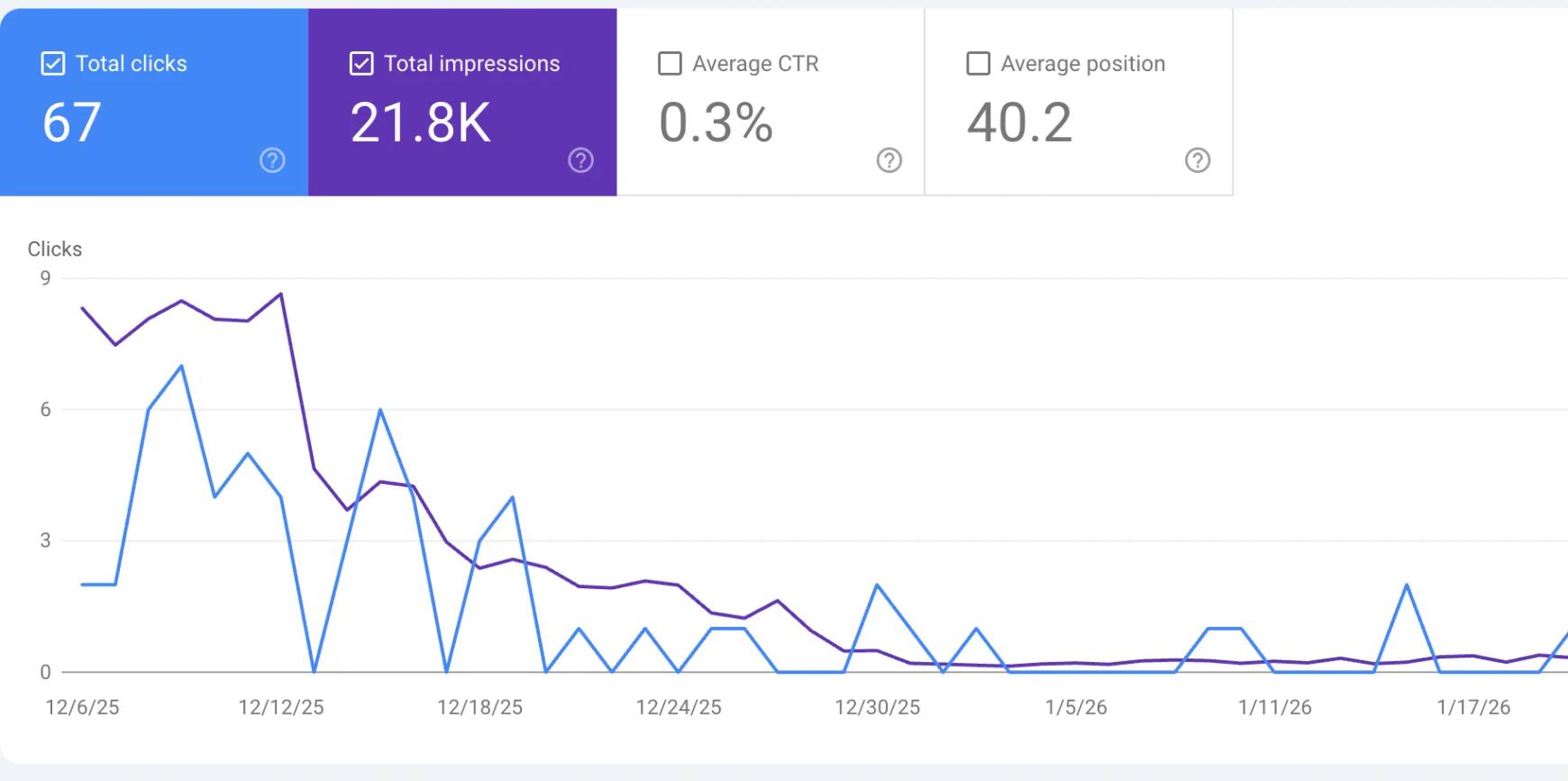
Here's what happened:
Mistake 1: I only submitted one sitemap
A Showit site with a blog has two sitemaps, not one. Your main site (everything you design in Showit) has its own sitemap. Your WordPress blog has a separate sitemap. They're not combined.
Most photographers go into Google Search Console, submit the Showit sitemap, and call it done. That's what I did. The result is that Google indexes your service pages and your homepage just fine, and almost completely ignores your blog. Months of blog content goes un-crawled because Google doesn't know it exists.
You have to submit both sitemaps separately in the Search Console. The Showit sitemap covers your designed pages. The WordPress sitemap (usually generated by Yoast or Rank Math - make sure you set one of those up) covers your blog. Submit both. Check both for coverage errors. If you've been blogging on Showit for a while and your posts aren't ranking, this is the first thing to check.
Mistake 2: Showit silently stripped the trailing slashes off all my old URLs (and they 404'd)
This is the one that actually tanked my rankings.
My old site had trailing slashes on every URL. /seo-for-photographers/, /about/, /services/. That's how Google had indexed them. That's what every backlink pointing at my site went to. Years of accumulated SEO equity, all sitting on URLs ending in a slash.
Then I migrated to Showit. Showit doesn't use trailing slashes, and the platform doesn't automatically handle the old versions. There were no redirects in place. Every URL Google had indexed was now a 404, a major problem.
Visually, nothing looked broken. I'd click around the new site and every page loaded fine, because I was clicking on the new no-slash URLs. The old slash versions, the ones Google had spent years indexing, were just dead. Every backlink pointing to /seo-for-photographers/ was hitting a 404. Every cached search result. Every shared link. All gone.
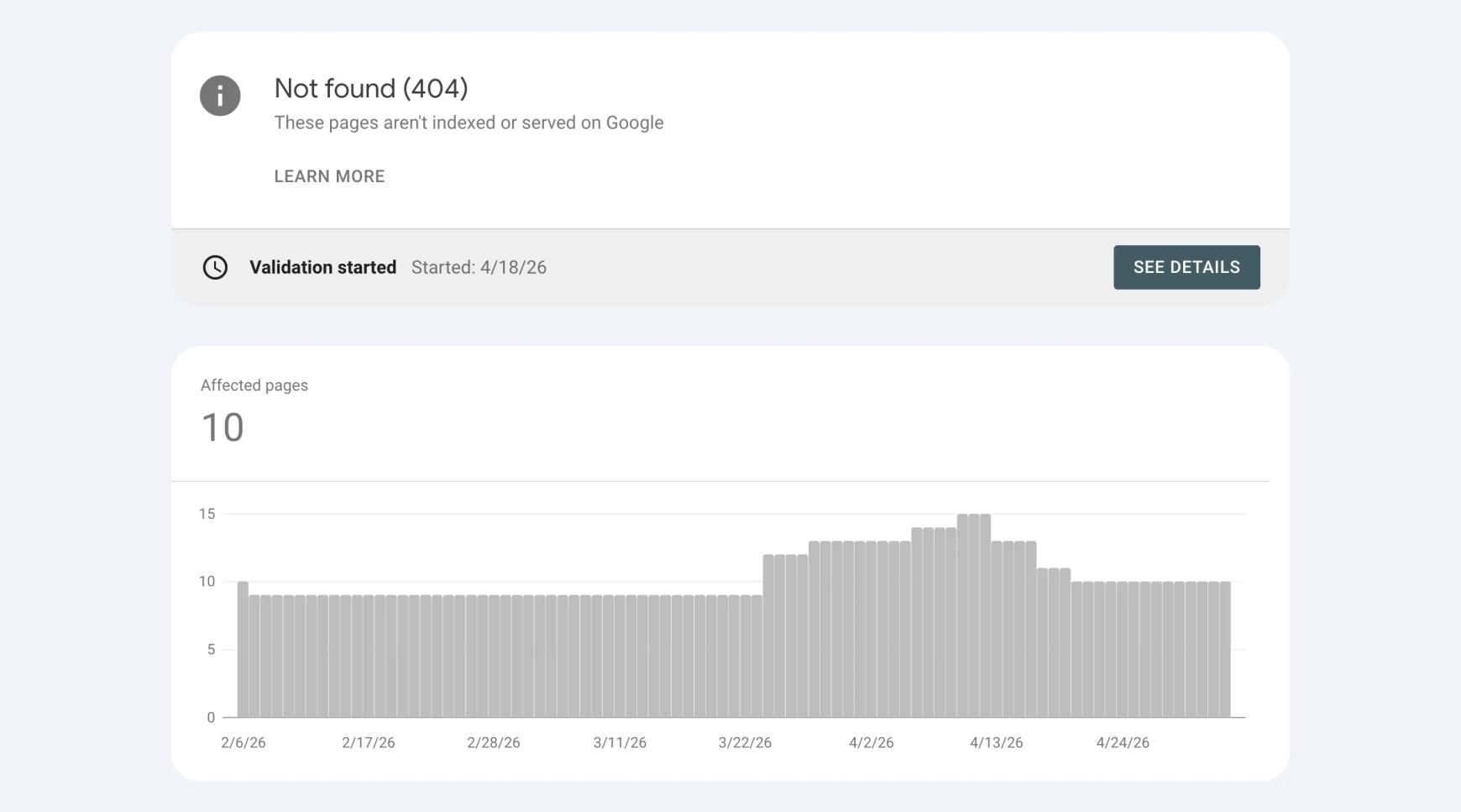
I caught it in Google Search Console a few weeks later. Pages I knew existed were showing up as "Not found (404)" in the coverage report. My rankings tanked because Google was watching its indexed URLs disappear from the internet, and an indexed URL that 404s is a much bigger problem than a redirected one. A redirect passes most of the link equity. A 404 passes nothing. Pages that had been on page one started slipping. Long-tail terms stopped getting impressions. The site lost weeks of momentum.
The fix had to happen on the WordPress side, through the redirect plugin that Showit pre-installs when you set up your blog. (If you have a Showit site with a blog, you have access to this. Most photographers don't realize it's there.) I went into WordPress, opened the redirect plugin, and set up 301 redirects from every old trailing-slash URL to its new no-slash version. /seo-for-photographers/ to /seo-for-photographers, page by page, for every URL that used to be indexed.
Then I had to wait. Google had to recrawl everything, see the redirects, and update its index. That took weeks before I saw the results trickle in. Some pages came back almost to where they'd been ranking. Some never fully recovered.
If you're migrating to Showit from any other platform, this is the single most important thing to check before you flip the switch. Pull your top indexed URLs from Google Search Console. Note which ones have trailing slashes. The day you launch on Showit, set up 301 redirects in the WordPress redirect plugin for every one of those old URLs before Google has a chance to crawl them and find a 404. Don't trust that "the page loads when I click it" means the URL didn't change. Look at the actual URL bar.
This is the kind of detail nobody warns you about because nobody who hasn't been burned by it knows to look for it. Now you do.One more note: make sure you check if your current site has a “www” at the start or not. If it does have that, you’ll need to either redirect all “www” or you have to actually ask ShowIt to set that up for you. There’s no simple way to do this.
If you're building a new Showit site, do these things first
This is the part nobody else covers. Most Showit SEO articles are written for people who already have a site. If you're building from scratch (or having one built), you have a chance to avoid every problem above by setting things up right the first time.
Plan your URL structure before you name a single page
Decide your URL hierarchy first. /about, /weddings, /families, /pricing, /contact, /blog. Then name your pages to match. Don't name a page "Home Sweet Home" if you want the URL to be /about.
Write your page titles, meta descriptions, and H1s before designing
Pick the keyword for each page first. Write the H1 to include the keyword naturally. Write the SEO title (under 60 characters) and meta description (under 155 characters) before you place a single text box. The design follows the SEO, not the other way around. If you don't know what keyword to use, start with my guide to SEO keywords for photographers.
Audit your heading tags as you build, not after
Every time you place a text element, decide whether it's an H1, H2, H3, or paragraph. Default everything to paragraph unless it's structurally a heading. The heading hierarchy should make sense if you read just the headings on the page in order.
Set up your image workflow before you start uploading
Rename your image files before uploading. Use descriptive names with dashes ("denver-wedding-photographer-mountain-ceremony.jpg" not "DSC_4129.jpg"). Compress them under 200KB. Have your alt text written before you place the image.
Connect Google Search Console on day one
The day your site goes live, connect Google Search Console. Submit your sitemap(s). Start tracking impressions and clicks immediately. The earlier you have data, the faster you can identify what's working.
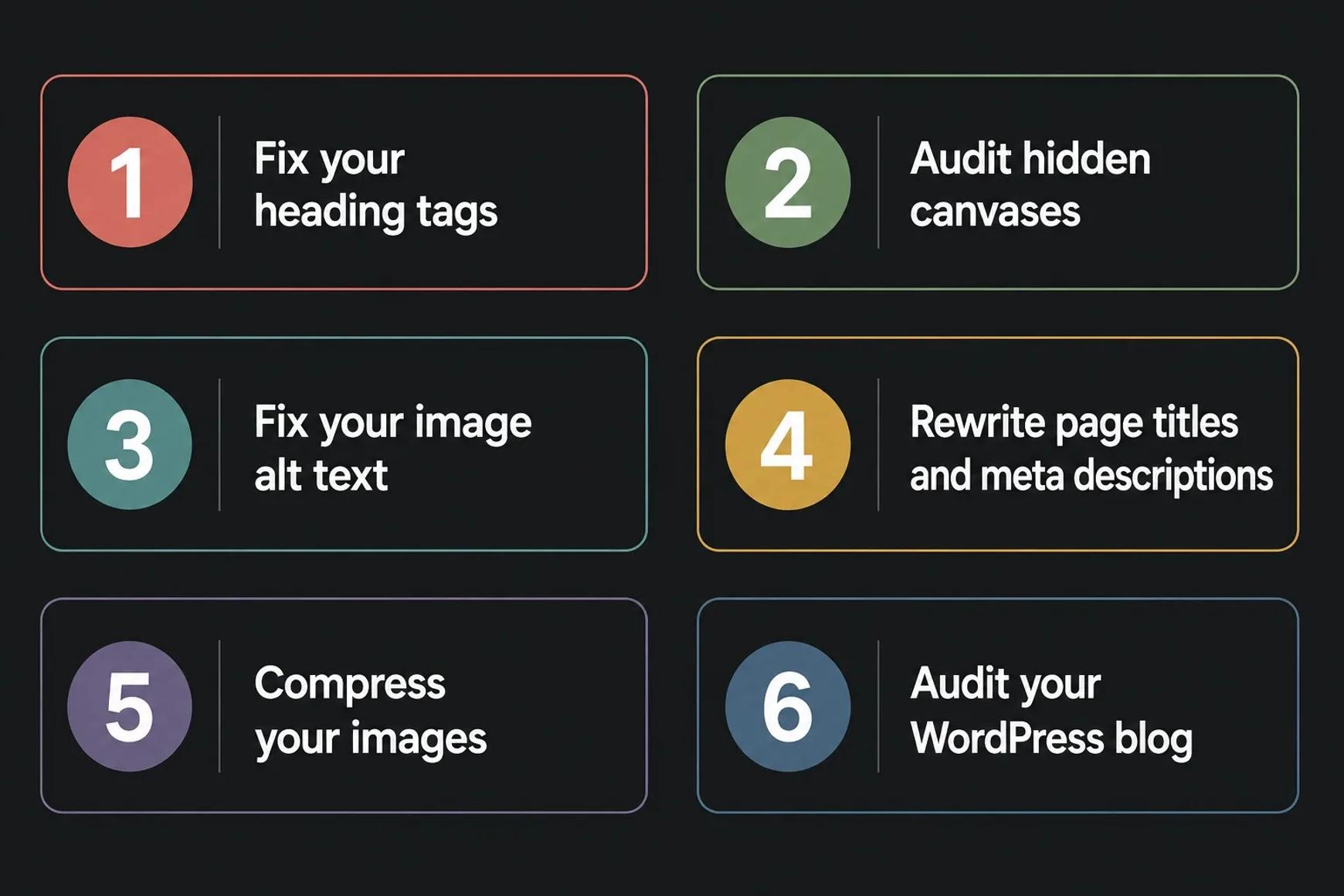
If you're auditing an existing Showit site, fix these in order
If you already have a Showit site that's not ranking, work through this list in order. The order matters because some fixes depend on others.
1. Fix your heading tags
Open every page in Showit. Click each text element. Make sure there's exactly one H1 per page. Make sure H2s mark major sections. Demote any decorative text that's tagged as a heading. This is the highest-impact fix on most sites.
2. Audit hidden canvases
Switch between desktop and mobile views on every page. Look for filler text, broken links, old content, or duplicate sections. Delete anything you're not using on either view.
3. Fix your image alt text
Click every image and write actual descriptive alt text, not keyword stuffing. Aim for clarity first, keywords second.
4. Rewrite page titles and meta descriptions
Every page needs a unique SEO title under 60 characters and a meta description under 155 characters. Both should include the keyword for the page. The meta description should read like a mini-ad that makes someone want to click.
5. Compress your images
Run every image through ShortPixel or TinyPNG. Upload or Re-upload the compressed versions. Test your site speed before and after on PageSpeed Insights.
6. Audit your WordPress blog
Log into WordPress (most photographers haven't logged in for months). Install Yoast or Rank Math if you haven't already. Open every blog post and check that it has a focus keyword, a proper meta description, and decent heading hierarchy. This is usually where the biggest gains are hiding. Both Yoast and Rank Math will guide you through best practices by scoring your content based on the keyword you input.
The Showit blog: SEO's biggest opportunity nobody is using
I've said it twice but it's worth its own section. The Showit blog is built on WordPress, which means it's a separate platform from the rest of your site. The settings are different. The optimization is different. The plugins are different.
Most photographers treat their blog as an afterthought. They write a quick post about a recent shoot, hit publish, and move on. The post has no focus keyword, no real meta description, no internal links to anything. It exists, but it doesn't earn anything. They also rarely mention location - a HUGE SEO signal when done correctly and for photographers who go to their clients.
Worse, almost all photographers are missing the link-building side of blogging entirely. Strong blog content is one of the best ways to earn the kind of backlinks that move rankings, and ignoring your blog means ignoring that entire channel. If you want to understand how that piece works, check out my complete guide to backlinks for photographers.
Here's what your WordPress blog should be doing:
- Running Yoast SEO or Rank Math (free versions are fine for most photographers)
- Targeting one specific long-tail keyword per post
- Internally linking back to your service pages and homepage with descriptive anchor text
- Including alt text on every main image, file-renamed before upload
- Using a clear heading hierarchy with one H1 (usually the post title) and H2s for sections
- Featuring images that are compressed and properly named
If you need topic ideas, I have an article with 42 photography blog post topics that's a great starting point. Pick ten, write one a week, and your traffic should start moving within a few months.
Showit SEO vs Squarespace SEO vs WordPress SEO
Quick comparison since this is the question I get asked most. None of these platforms is significantly better or worse than the others. They have different strengths.
| ShowIt | SquareSpace | Wordpress | |
|---|---|---|---|
| Design Freedom | Excellent | Limited | Excellent (With Builder) |
| SEO Control | Full | Moderate | Full |
| Blog Platform | Wordpress (Built-in) | SquareSpace Native | WordPress Native |
| Site Speed | Moderate | Good | Variable |
| Plugin Options | Massive (WordPress) | None | Massive |
| Learning Curve | Moderate | Easy | Steep |
| Best for Photographers | YES | OK | If Technically Savvy |
Showit wins on design freedom and gives you full SEO control plus the WordPress blog. Squarespace wins on ease of use but you give up design flexibility. WordPress wins on plugin power but it's not realistic to run yourself unless you're comfortable with the technical side. For most photographers, Showit is the right choice. Not because it's magically better at SEO, but because it lets you build a beautiful site that ranks without the maintenance overhead of WordPress.
Frequently asked questions about Showit SEO
Is ShowIt bad for SEO?
No. ShowIt is fine for SEO when it's set up correctly. The platform gives you full control over every SEO element that matters. Most ranking problems on ShowIt sites come from how the site was built, not from the platform itself. Bad heading tags, missing alt text, and poorly optimized blog posts will hurt your rankings on any platform.
Can a ShowIt website rank on page one of Google?
Yes. I have clients on ShowIt ranking on page one for competitive local photography keywords. So do other SEO professionals who work with Showit. The platform is fully capable of ranking. What it can't do is rank by itself, but no platform can do that.
Is Showit better than Squarespace for SEO?
They're roughly equivalent on the SEO basics. Showit has the edge because of its WordPress blog integration, which gives you access to plugins like Yoast and Rank Math that Squarespace can't match. If you plan to blog seriously, Showit is the stronger choice. If you only need a five-page brochure site and don't want to think about platforms ever, Squarespace is easier to manage.
Why is my Showit website loading slowly?
Usually it's image weight. Most Showit photographers upload portfolio images that are bigger than they need to be. Run every image through ShortPixel or TinyPNG and aim for under 200KB. The other common cause is having too many images on a single page. Twelve well-chosen portfolio images load faster and convert better than sixty.
Do I need to use the Showit blog or can I skip it?
You can skip it, but you're giving up most of your SEO potential if you do. Your blog is where you rank for long-tail searches that lead to bookings. Wedding venue blog posts, location guides, vendor recommendations, pricing guides. None of that fits on your service pages, but all of it builds the topical authority that pushes your service pages up the rankings.
Can I add schema markup to a Showit website?
Yes. You can paste JSON-LD schema into the head of your site through Showit's site-wide HTML field, or page by page in the page settings. LocalBusiness schema is a must for any photographer with a service area. Article schema on blog posts and FAQ schema where appropriate are also worth adding.
Should I switch from Showit to a different platform for SEO?
Almost never. Switching platforms is one of the most disruptive things you can do to a site, and it almost never improves SEO on its own. Before you consider switching, fix the things in this article. If your heading tags are clean, your alt text is in the right field, your blog is optimized, your images are compressed, and you're still not ranking after six months of consistent effort, then think about a switch. Most photographers never get to that point because the basic optimization gets them where they want to be. If your reason for switching is because you don’t like the platform, then that’s a good reason to switch from any platform.

The bottom line
Showit is good for SEO. It's also possible to build a Showit site that ranks badly, because the platform's design freedom doesn't enforce best practices. The fix isn't switching platforms. It's understanding what to do at design time and what to fix in audits.
Most of the photographers I work with came to me after months of frustration trying to figure this out from generic Showit SEO articles or YouTube tutorials that only cover the surface. They weren't doing anything wrong. They just didn't know what to do or where to focus.
If you want a Showit site that's built for SEO from the foundation up, that's what I do for photographers. Get in touch and we'll talk through whether it's the right fit.
Not sure about some of the SEO terminology used in this article? My plain-English SEO glossary for photographers covers all the key terms with simple definitions.